
We are excited to announce a new feature on StatusGator that will take your status page to the next level! You can now not only communicate incidents for custom monitors but also schedule maintenance and notify your status page subscribers effortlessly.
What’s New?
Scheduled Maintenance for Custom Monitors: Planning a system upgrade or routine maintenance? Now you can schedule maintenance events directly within StatusGator for your custom monitors. This feature allows you to manage and communicate planned downtime on your Status page in advance, keeping your operations smooth and your users informed.
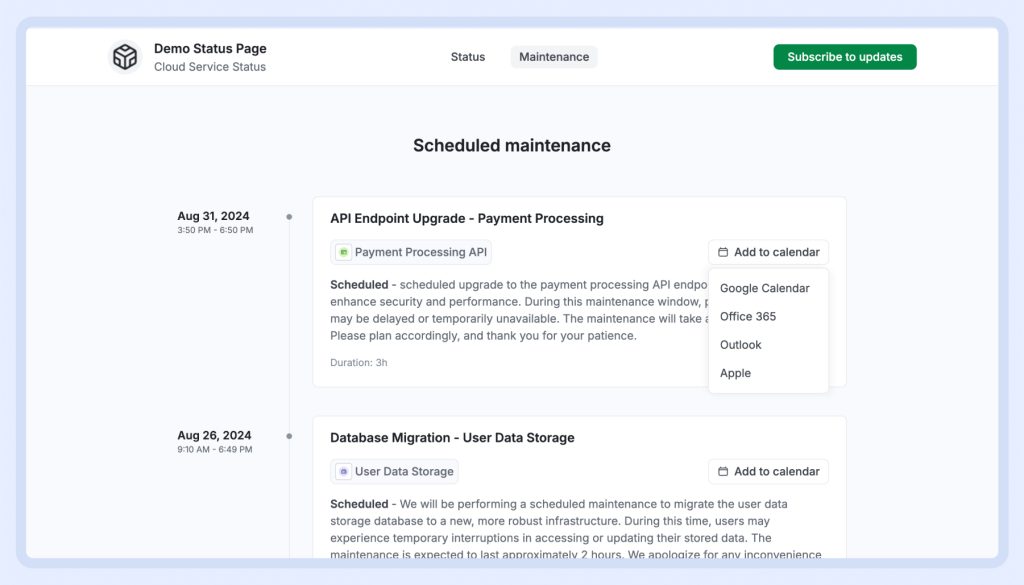
Here are some examples of how you can use this feature:
- For IT Departments: Schedule maintenance for internal IT systems, such as employee portals, email servers, or network infrastructure, and keep your team informed about planned disruptions.
- In educational institutions: Schedule maintenance for school Wi-Fi networks, website, printers, or internal library portals, ensuring that students and staff are aware of when these services will be temporarily unavailable.
- For SaaS products: If you run a SaaS platform, schedule maintenance events to notify users about upcoming downtime for updates or improvements to your service.
Note: To schedule maintenance, you first need to add custom monitors. Learn more about custom monitors.
Subscriber Notifications: Keep your subscribers in the loop with automated notifications about upcoming maintenance. Ensure that everyone who relies on your service is aware of the scheduled downtime, reducing the potential for confusion and frustration.

Why It Matters
Proactive communication: Just like with incidents, by scheduling maintenance and notifying subscribers ahead of time, you demonstrate transparency and reliability. Your users will appreciate being informed in advance, allowing them to plan around the maintenance window.
Improved user trust: Keeping your users updated about planned maintenance builds trust. It shows that you are committed to providing a reliable service and that you value their time and experience.
Streamlined operations: With everything managed in one place, you can focus on running your business without worrying about missed communications or uninformed users. StatusGator makes it easy to ensure everyone is on the same page.
How to Get Started
- Sign in to your StatusGator account.
- To schedule maintenance, you first need to add custom monitors. Learn more about custom monitors in case you haven’t added them yet.
- Navigate to the scheduled maintenance section and click on “Schedule maintenance” button in the upper right corner.

- Add the details of your planned maintenance, including the name, event description, start and end times, and affected monitors.

- Choose if you want to notify your Status page subscribers, and optionally set reminders in advance.

- Save and let StatusGator handle the rest!
Have any questions or product requests? Feel free to reach out to us at hi@statusgator.com or visit our support portal. We’re here to help!