


StatusGator+SMS
Send SMS notifications to your team.
Overview
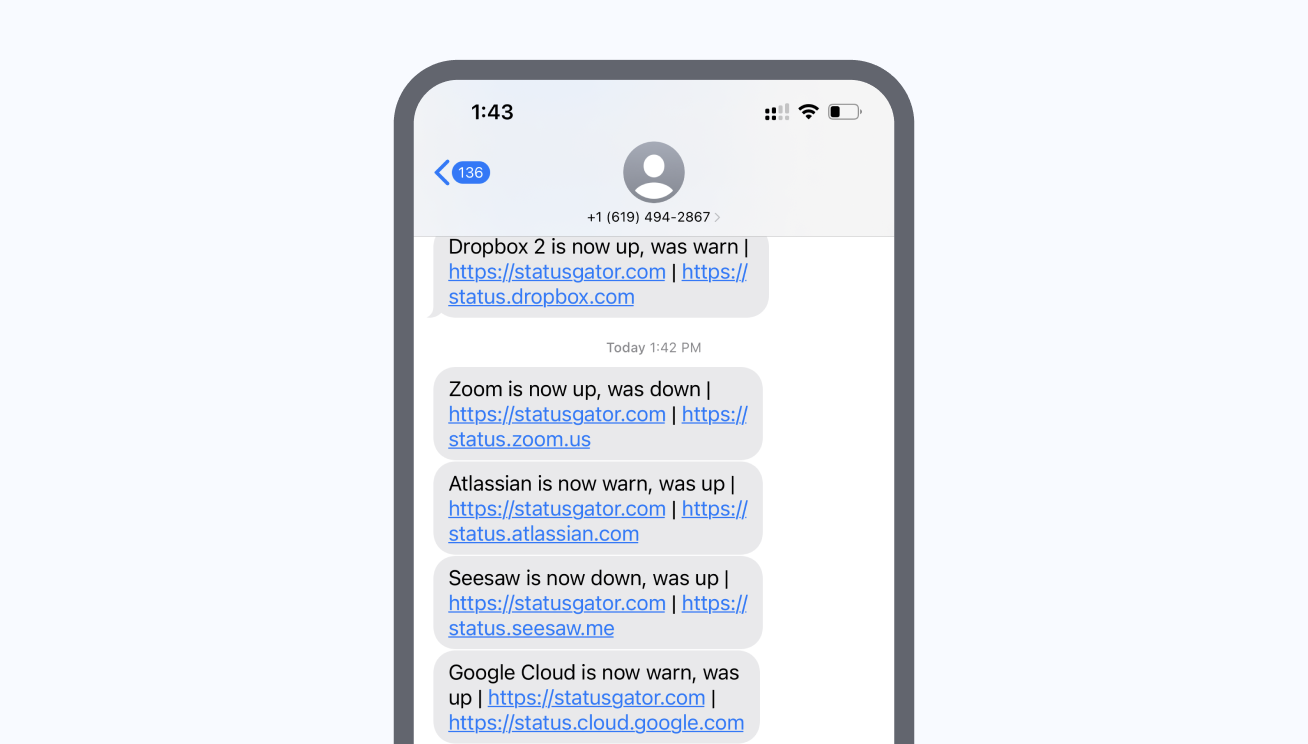
Integrating SMS with StatusGator provides a direct and immediate way to receive notifications about outages affecting your monitors. SMS notifications are ideal for urgent alerts, ensuring that your team stays informed even when they're on the go. By sending notifications via SMS, you can quickly reach team members and initiate timely responses to service incidents.
Key features
- Immediate alerts: Receive instant SMS notifications for service disruptions, ensuring timely awareness of critical issues.
- Customizable recipient list: Add and manage phone numbers to ensure all key team members are notified promptly.
- On-the-go accessibility: Stay informed about outages and incidents, even when away from your desk, with direct SMS alerts.
Integration details
Start free trialCategory
Supports
- Incidents
- Early Warning Signals
Available on plans
Business plans
-
Free
-
Starter
-
Team
-
Corporate
-
Enterprise
Education plans
-
Free
-
Small
-
Medium
-
Large
-
Extra Large
Resources
Help docFrequently asked questions
-
How do I integrate StatusGator with SMS?
To integrate StatusGator with SMS, go to the Integrations page in your StatusGator account, find the SMS option under the Notification category, and follow the setup instructions to configure your phone number for SMS alerts. -
What happens when a service goes down?
When a monitored service experiences downtime, StatusGator will automatically send an SMS notification to your phone number, providing detailed information about the service disruption. -
What information will I receive in the SMS notifications?
You will receive SMS notifications that include the service name, the previous and current status of the service, and links to both the StatusGator status page and the official status page for more details. -
Can I customize the sender name or content of the SMS notifications?
All StatusGator SMS notifications are sent from +1 (619) 494-2867, and customization of the sender name or content is not available. However, we are continuously improving our features and may offer more customization options in the future. -
How can I stop receiving SMS notifications from StatusGator?
To stop receiving SMS notifications from StatusGator, you can disable or pause the SMS integration in your account settings or unsubscribe from SMS alerts by replying "STOP" to any SMS notification you receive from StatusGator. -
Can I receive SMS notifications for specific services only?
Currently, StatusGator sends SMS notifications for all services that you have added to your account. We do not offer the option to receive SMS notifications for specific services only. -
What country codes are supported for SMS notifications?
StatusGator supports SMS notifications for phone numbers in the following countries. But if you need a country code that is not listed here, please contact our support team for assistance.- +1 - United States/Canada
- +7 - Russia/Kazakhstan
- +30 - Greece
- +31 - Netherlands
- +33 - France
- +40 - Romania
- +45 - Denmark
- +46 - Sweden
- +48 - Poland
- +49 - Germany
- +54 - Argentina
- +55 - Brazil
- +61 - Australia
- +64 - New Zealand
- +66 - Thailand
- +81 - Japan
- +82 - South Korea
- +84 - Vietnam
- +86 - China
- +90 - Turkey
- +91 - India
- +972 - Israel
- +375 - Belarus
- +379 - Vatican City
- +380 - Ukraine
- +852 - Hong Kong
Can't find your question? Email us to arrange a time to discuss. We'd love to chat!
