SharePoint Online outage on
March 6, 2026

Read more >

Improved SSO setup and
logging

Read more >

StatusGator logo
Schedule a Demo
StatusGator logo
Use cases

IT Teams

Stay informed of outages and reduce tickets

DevOps

One status page for all your providers

Education

Features designed specifically for K12

Enterprise

Advanced features designed for enterprise

Managed service providers

Impress clients with proactive monitoring

Competitive intelligence

Analyze and compare peer performance

Monitor dependencies to prevent revenue loss

Create and manage custom status pages for your product

Features

Status page

A status page with service, website, and custom monitors built-in

Status aggregation

Aggregate the status of all vendors to a single page

Cloud monitoring

Monitor all your cloud services from a single dashboard

Website monitoring

Monitor your website with uptime monitoring built-in

Monitor network connectivity

Control the status of custom monitors manually with incidents

Get notified of disruptions before they become public

Pricing

Business

From startup to enterprise and everything in between

Education

Special plans and discounts for K12 and higher ed

Integrations

Incident Management

Better Uptime
FireHydrant
Opsgenie
PagerDuty

Notifications

Private Status

AT&T status
AWS status
Azure status
Microsoft 365 status
Zendesk status

Status Pages

Atlassian Statuspage
StatusHub

Advanced

Sign In Sign Up

New in StatusGator: Reordering Services

As our status pages have become more popular, so has the ability to customize them. Over the next several weeks, we will be rolling out a series of features that allow more customization of your status page. Already we’ve added custom CSS capabilities. Today, we’re rolling out service reordering.

Our new dashboard management page has a slimmed-down look. The service search box is now hidden behind the Add Services button. Click Add Services to expand the search box and add more services to your dashboard.
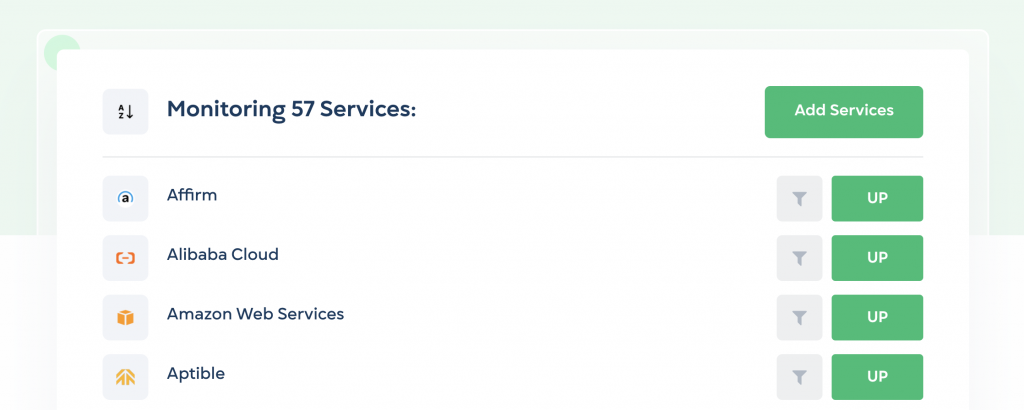
More importantly, you can now drag and drop the services on your dashboard to put them in any order that you want. This order will be reflected on your public status page. Use this to put your most important services at the top, or group together services for certain uses.

Let us know if you’d like to see a grouping or folder-like service structure. We really need your feedback to know if that would be useful.

If you decide you’d rather just keep your services alphabetical, you can press the A-Z button at the top left of your dashboard to resort the services in alphabetical order.

Here’s a quick video of service reordering in action. Reach out and tell us what you think!

StatusGator service reordering. Monitor hundreds of cloud services and aggregate them into a single page — now in whatever order you like!

Share this

Photo of author

Colin Bartlett

Colin Bartlett is co-founder of StatusGator and Nimble Industries, a seasoned Ruby engineer and entrepreneur who launched StatusGator in 2015 and later grew it into a full-fledged company.