You can now receive a webhook notification whenever someone submits an outage report on your StatusGator status page. We’ve also added event selection, so you can choose exactly which types of notifications your webhook receives.
Choose which events to receive

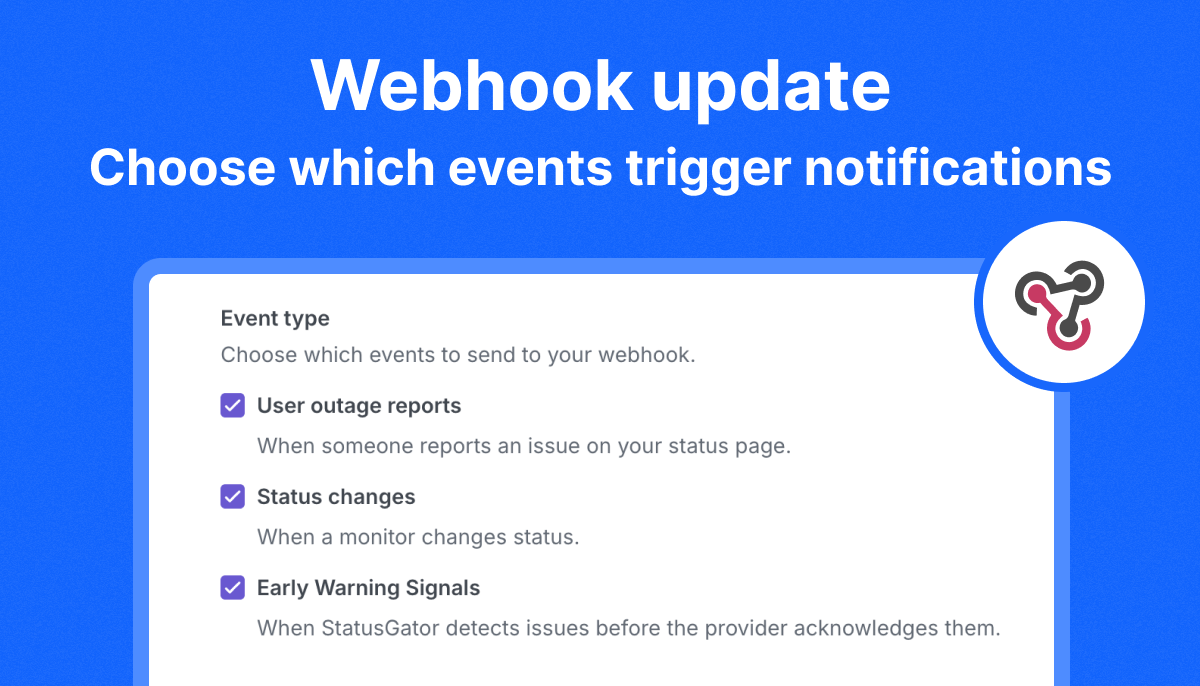
The new Event type section in your Webhook integration settings lets you select any combination of:
- User outage reports: When someone reports an issue on your status page.
- Status changes: When a monitor changes status.
- Early Warning Signals: When StatusGator detects issues before the provider acknowledges them.
Enable all three to bring these events into your workflows, or select only the events relevant to your team. For example, a webhook used to collect user feedback could receive only outage reports, while another workflow handles status changes and Early Warning Signals.
How to get started
- Open Integrations in your StatusGator account.
- Open your Webhook integration.
- Under Event type, select the notifications you want to receive.
- Save your changes.
With outage report notifications and event selection, you have more flexibility to connect StatusGator to your internal tools and automate how your team responds.