


Show cloud outages on your OptiSigns screens
Put live StatusGator status right on your OptiSigns digital signage so everyone can see cloud and vendor health at a glance.
Combine StatusGator and OptiSigns for shared visibility
OptiSigns powers the screens across your offices, help desks, NOCs, and break rooms. StatusGator complements OptiSigns by monitoring the cloud providers, SaaS platforms, APIs, and third-party services your business depends on.
The StatusGator OptiSigns integration lets you display your StatusGator board on any screen through the OptiSigns Embed app. Employees see real-time vendor outages, maintenance events, and service health throughout the office, and the board refreshes automatically whenever a monitored status changes — no one needs to log in.
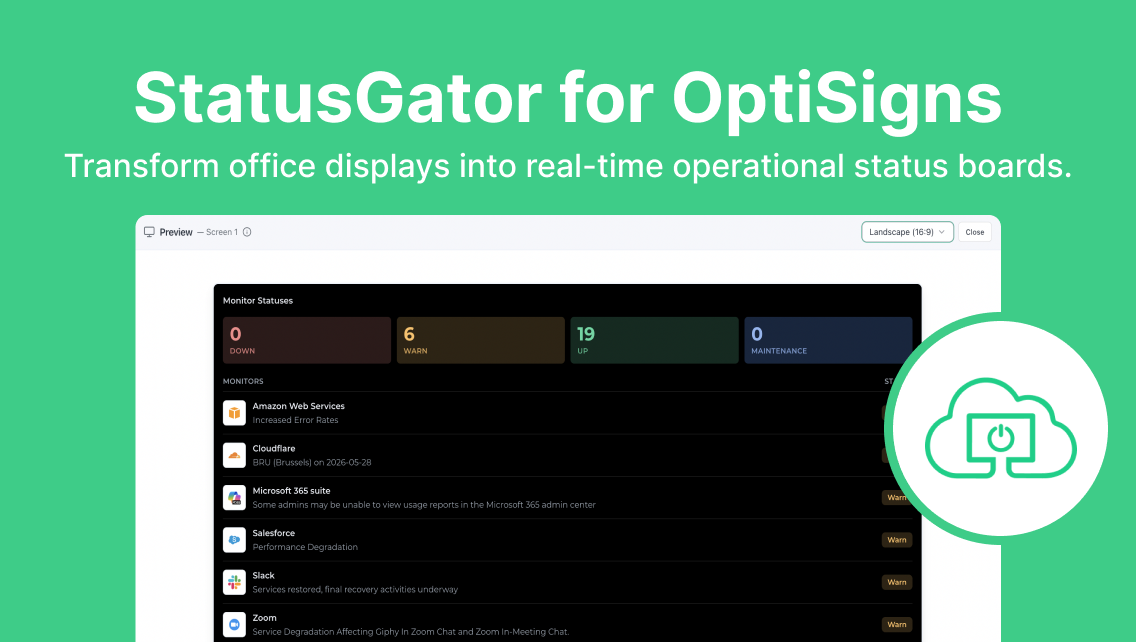
Why integrate StatusGator with OptiSigns
- Real-time vendor monitoring: StatusGator continuously monitors cloud providers, SaaS platforms, APIs, and external services for outages, maintenance events, and service disruptions.
- Native OptiSigns display: Show StatusGator dashboards on any OptiSigns screen through the built-in Embed app, styled to match OptiSigns for a seamless look.
- Always-on status wallboards: Keep live vendor status visible in NOCs, help desks, and offices so teams spot issues the moment they happen.
- Unified operational visibility: Bring dependency monitoring onto the same screens your team already watches every day.
- Easy configuration: Generate an embed code in StatusGator, paste it into an OptiSigns Embed app, and push it to your screens in minutes.
Integration details
Start free trialCategory
Available on plans
Business plans
-
Free
-
Starter
-
Team
-
Corporate
-
Enterprise
Education plans
-
Free
-
Small
-
Medium
-
Large
-
Extra Large
Resources
Help docStay ahead of outages with OptiSigns + StatusGator
Keep vendor status and service health visible on every screen.
How to set up StatusGator + OptiSigns
Generate the embed code
Create an Embed app in OptiSigns
Push to your screens
Frequently asked questions
Can't find your question? Email us to arrange a time to discuss. We'd love to chat!
Other integrations

Rise Vision
Show your status page on Rise Vision digital signage.

TV
Display your status page on a TV.
We have 40 integrations. See all